Python
The language used for the CLI and vault logic.

Personal Python project
Secure Command-Line Password Manager
A command-line password manager built in Python that securely stores account credentials in an encrypted local vault.
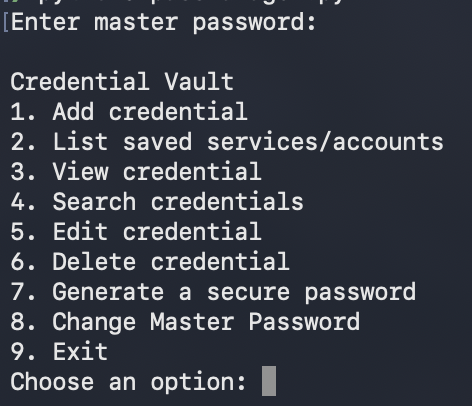
I built Password Manager to run in the terminal and give users a simple way to securely save and manage login credentials. It supports adding, viewing, searching, editing, and deleting entries, generating secure passwords, and changing the master password.
Everything stays stored locally instead of being sent to an online service.
I wanted to learn more about encryption, password-based key generation, secure local storage, and handling sensitive data. Building a useful command-line application gave those ideas a real workflow instead of leaving them as isolated concepts.
When the program starts, the user enters a master password. That password is not stored directly. Instead, the application combines it with a random salt to create an encryption key, which is then used to unlock the encrypted password vault.
Saved credentials remain encrypted on disk when the program is not running.
The language used for the CLI and vault logic.
Derives an encryption key from the master password while making guessing attempts more expensive.
Encrypts and decrypts the stored credential data.
Adds unique input when creating a key from the master password.
Confirms the master password without storing it directly.
Uses safe file replacement so interrupted saves are less likely to corrupt the vault.
Creates strong random passwords from the command line.
Re-encrypts the vault when the master password changes.
Checks important vault, encryption, and recovery behaviors.
The project includes automated tests for correct and incorrect master passwords, encryption and decryption, adding, editing, deleting, and reloading credentials, malformed records, atomic saves, and master-password rotation.
This is targeted project testing, not exhaustive security testing.
This project helped me understand encrypted data persistence, password-based key derivation, file safety, and why storage, encryption, and interface responsibilities should be separated. It also gave me practice with unit testing, error handling, and debugging an older codebase through refactoring rather than immediately rewriting it.
Password Manager is stored locally, has no cloud sync or browser extension, and has not undergone a professional cryptographic audit. Forgotten master passwords cannot be recovered. It is a focused learning project, not a production-ready password service.